Turning Simple Sketches into High-Impact Visuals: A Look at SketchUp and Lumion in My Rendering Workflow

Over the past several weeks, I’ve been exploring how simple, hand-drawn sketches can be transformed into fully realized, photorealistic images using a combination of SketchUp and Lumion. These studies have not only highlighted the power of these tools, but also demonstrated how effectively they communicate design intent long before construction begins. Each case study started with a unique sketch from an artist or architect, and each evolved into a set of digital images that tell a complete visual story.

The first study centered on a concept sketch by Kirley Architects. The drawing captured the essential geometry and proportions of the design, but translating it into a fully modeled environment required interpreting line weight, perspective, and implied texture. SketchUp provided the structural foundation—clean geometry, accurate scale, and a flexible platform for quickly iterating on architectural form. Lumion then expanded the model into a lifelike environment through lighting, materials, reflections, and atmospheric effects. The final render clearly showed how a loose conceptual drawing can evolve into a convincing visual representation of the built space.


The second study featured a piece by ZiwiCreates, whose sketch used expressive lines to convey movement and personality. Here, the challenge was preserving the original energy of the drawing while refining its form in 3D. SketchUp once again allowed for quick massing, proportion adjustments, and detailed modeling. With Lumion, subtle lighting choices, material selections, and environmental cues brought the concept into focus. The comparison demonstrated how a stylized sketch can still result in a highly polished, professional visualization that remains faithful to the designer’s intent.


The third study drew from a sketch by Yann Leroy. This comparison focused on how color, materiality, and natural lighting can transform a simple black-and-white drawing into a fully illuminated scene. SketchUp handled the structural translation, while Lumion elevated the image with realistic weathering, shadows, and landscape elements. The final visualization provided clients and collaborators with a clear understanding of the depth, tone, and atmosphere of the proposed design—far beyond what the original sketch alone could convey.

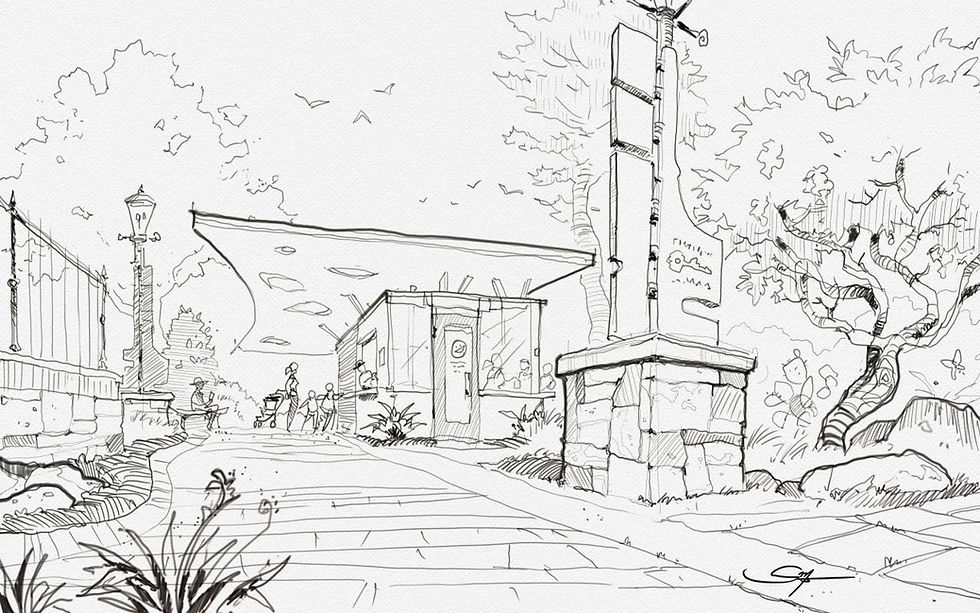
The fourth and most recent study took a slightly different approach. Based on a sketch by Sterling Morris, the focus shifted from architecture to atmosphere and emotional tone. The goal was to translate not only the layout and spatial concept, but also the feeling of the place. One version of the Lumion render leaned into full realism—natural lighting, reflective surfaces, and animated environmental elements. Another version intentionally maintained the loose, sketch-like feel of the original drawing, using Lumion’s artistic filters and softened edges to strike a balance between concept and realism. This case demonstrated how visualization is not only a technical skill, but also a storytelling tool that captures mood, light, and experience.

Across all four studies, a consistent pattern emerged. SketchUp excels at quickly shaping the structure and defining the geometry, which allows ideas to be built and tested immediately. Lumion then takes those ideas and turns them into highly immersive imagery that communicates texture, light, and atmosphere. Together, they form a powerful toolset capable of elevating even the simplest sketch into a clear, compelling visual narrative.
These case studies highlight what I enjoy most about digital visualization—the process of taking something simple and turning it into something that feels alive. Whether for architects, landscape designers, or artists, this workflow offers a reliable way to translate ideas into images that inspire, inform, and engage.
For further exploration of these projects, please see my Case Studies Page.
If you’d like to explore how this process could support your next project, feel free to reach out.
Comments